Cherry Ai: A Sweet Decorative Font for Charming Designs
Finding a font that feels both special and usable is a real win. You want something with personality, but it can't be so quirky that it becomes illegible or limits your design scope. Cherry Ai hits a sweet spot. It's a decorative display font that immediately brings a sense of warmth and authenticity to a project. Think of those handwritten notes from a loved one or the charming label on a jar of artisanal jam—that’s the feeling this typeface evokes.
Understanding the Character of Cherry Ai
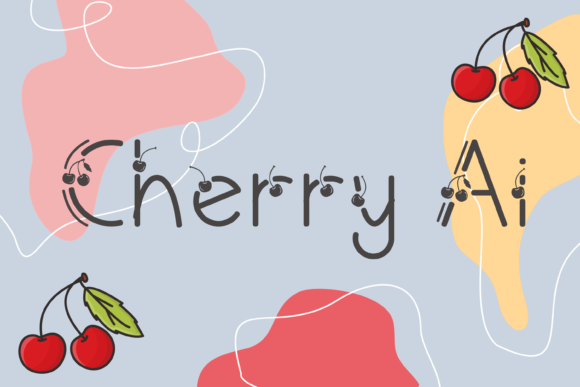
At its core, Cherry Ai is a script font with a distinctly handwritten font feel. Its letterforms have a gentle, flowing quality, as if crafted with a steady but relaxed hand. The defining feature, of course, is the lovely cherry ornaments. These aren't just simple dots; they're thoughtfully designed details that integrate seamlessly into the letter shapes or can be used as standalone decorative elements. This gives the font a playful, almost storybook quality without feeling childish.
The overall personality of Cherry Ai is approachable, whimsical, and authentic. It carries a certain nostalgia, reminiscent of vintage greeting cards or classic stationery. Yet, its clean lines prevent it from looking dated. It's a creative font that feels personal, making it perfect for projects where you want to build an immediate emotional connection with your audience.
Where to Use This Charming Typeface
The strength of Cherry Ai lies in its versatility for specific applications. It’s not a workhorse body text font, but as a display font, it shines in numerous contexts.
For Branding and Logo Design
A logo design using Cherry Ai can establish a brand identity that feels friendly, creative, and customer-focused. It’s particularly effective for businesses in the handmade, artisanal, food, beauty, or lifestyle spaces. Imagine it on a logo for a boutique bakery, a skincare line using natural ingredients, or a stationery shop. The font itself tells part of the brand story, suggesting care, quality, and a personal touch. Pair it with a simple, clean sans serif font for body text to create a balanced and professional brand identity.
In Marketing and Social Media
Attention is the currency online, and Cherry Ai is excellent at capturing it. For social media graphics, use it for headline quotes, promotional announcements, or story overlays. It adds a layer of visual interest that a standard serif font or sans serif font can't provide. It works beautifully for Instagram posts, Pinterest pins, and Facebook ads, especially for brands targeting a predominantly female audience or those in creative, wellness, or family-oriented niches.
Publishing and Editorial Design
In editorial design, this font can elevate a project from ordinary to memorable. Use it for chapter titles in a cookbook, pull quotes in a lifestyle magazine, or the cover of a self-published book of poetry. Its decorative nature makes it unsuitable for long-form reading, but as an accent in packaging design or book layout, it adds immense charm and visual hierarchy.
Personal and Commercial Craft Projects
This is where Cherry Ai truly feels at home. For crafters and hobbyists, it’s a dream for creating beautiful stationary art, eye-catching party invitations, custom gift tags, and cute greeting cards. Its authentic feel translates perfectly to physical products. For small business owners, using it on product hang tags, thank you cards, or packaging inserts can significantly enhance the unboxing experience and build brand loyalty.
Practical Guidance for Using Cherry Ai
Choosing the right font is only half the battle; using it effectively is what makes a design professional. Here’s how to get the most out of Cherry Ai.
Evaluate Project Fit: Ask yourself if the project’s tone matches the font’s personality. Cherry Ai is perfect for a friendly, approachable, or whimsical message. It would be less appropriate for a corporate law firm’s annual report or a high-tech startup’s investor deck. Context is everything.
Master Font Pairing: Because Cherry Ai is a strong decorative element, it needs a supportive partner. The classic rule of contrast applies here. Pair it with a neutral, highly readable serif font or sans serif font for body copy. Fonts like Open Sans, Lato, or a classic Garamond create a beautiful tension that lets the display font command attention without overwhelming the viewer.
Check the Included Styles: Before you start, explore what the font package includes. Does it have multiple weights? Are there additional alternates or swashes? Understanding the full toolkit allows you to use Cherry Ai more creatively and consistently across a project.
Prioritize Readability: Always test your text at the intended size and medium. A font that looks gorgeous on a large poster might become a blurry mess in a small caption. Use Cherry Ai for headlines and short phrases where its details can be appreciated, and save the legible sans serif font for the important information.
Understand the License: Since the prompt mentions it's a "freebie," verify the licensing terms. Most free fonts for personal use require a purchase for commercial projects. If you're using it for a client, for products you sell, or for significant brand assets, ensure you have the correct commercial font license to avoid legal issues down the road. Investing in a premium font license often comes with better support and more comprehensive features.
Cherry Ai is more than just a set of letters; it's a design asset